
Google’s Pixel 10 boasts AI-powered camera features like enhanced zoom, intuitive editing, and sharper portraits. Explore the latest upgrades
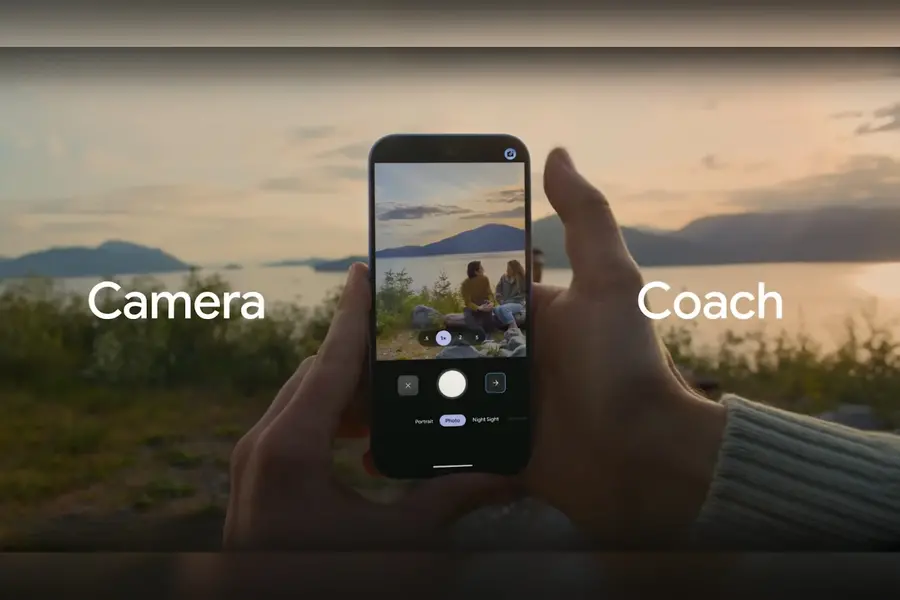
Google’s new Pixel 10 lineup is built to make photography and videography easier and more impressive than ever. Whether it’s sharp portraits, steady videos or creative zooms, the Pixel 10 series uses AI-powered tools to help users capture, refine and edit their memories effortlessly. From enhanced zoom to intuitive editing suggestions, here’s what the new Pixel 10 phones bring to the table.
Alongside the Pixel 10 smartphones, Google also unveiled the Pixel Watch 4 and Pixel Buds 2a at its Made by Google event on Wednesday.
1. Improved camera hardware for sharper shots
The Pixel 10 Pro and Pixel 10 Pro XL introduce Google’s most advanced camera system to date. An upgraded optical image stabilisation module now delivers double the range of motion correction, ensuring ultra-smooth results when paired with Video Boost for stabilised recording.
For the first time, the Pixel 10 also includes a 5x telephoto lens, offering exceptional zoom clarity, speedy autofocus, 10x optical quality and Super Res Zoom of up to 20x. Meanwhile, the Pixel 10 Pro Fold carries a new 48MP primary sensor alongside advanced ultrawide and telephoto lenses, unlocking features such as Macro Focus and Super Res Zoom.
2. Enhanced detail and more natural portraits
Google has fine-tuned its HDR+ pipeline for the Pixel 10 generation, with upgrades to colour processing, focus, noise reduction, detail and zoom. Portrait Mode now benefits from improved segmentation and sharpness for lifelike results. Owners of the Pixel 10 Pro and Pro XL can also shoot 50MP high-resolution photos for even more detail.
3. Gemini-powered camera coach
Great hardware still relies on the person behind the lens. That’s why Google has introduced Camera Coach, powered by Gemini AI models. This feature offers live guidance, suggesting adjustments in lighting, framing and composition. Alongside practical tips, Camera Coach helps users develop essential photography skills, turning casual snappers into the go-to photographers in any group.
4. Pro res zoom for extreme close-ups
Pixel 10 Pro and Pro XL extend their zoom range to an impressive 100x with Pro Res Zoom, designed for Tensor G5. Optimised for landscapes, wildlife and distant landmarks, the feature uses Pixel Camera’s first diffusion model for precision and clarity at extreme zoom levels.
5. Auto best take for group photos
Group shots no longer require endless retakes. Auto Best Take detects when multiple people are in frame, capturing up to 150 images within seconds to find the perfect expression for everyone. If no single frame works, it seamlessly blends the best elements together for a flawless group picture.
6. AI-powered editing in Google Photos
Editing has become more intuitive. Simply describe your desired changes in Google Photos—such as “remove window reflections” or “brighten the photo and add clouds”—and AI will handle the adjustments automatically.
7. Guided frame for accessibility
Guided Frame has been upgraded with Gemini models to offer richer descriptions of what the camera sees. With audio cues, vibrations and on-screen hints, users with low vision or blindness can take high-quality photographs independently.
8. More detailed panoramas
Panorama Mode now supports 5x telephoto panoramas, allowing users to capture expansive views in striking detail with resolutions up to 100MP, along with manual focus, zoom support and enhanced image processing.
9. Instant view on Pixel 10 Pro Fold
Checking your results no longer interrupts the flow of shooting. On the Pixel 10 Pro Fold, Instant View allows users to see their most recent captures directly alongside the viewfinder when the phone is unfolded, making it easy to adjust and refine shots in real time.
10. Content Credentials for image transparency
The Pixel 10 series debuts industry-standard C2PA Content Credentials directly in the native camera app. This on-device system embeds secure metadata into each image, documenting its creation process. The information is viewable in Google Photos, offering transparency and authenticity for every photo taken.
Published: 21 Aug 2025, 12:48 pm IST
Disclaimer: Kindly avoid objectionable, derogatory, unlawful and lewd comments, while responding to reports. Such comments are punishable under cyber laws. Please keep away from personal attacks. The opinions expressed here are the personal opinions of readers and not that of Mathrubhumi.
