
Ganesh Chaturthi 2026 is here, and ChatGPT can help transform ordinary family photos into festive Ganpati celebration portraits using simple AI image prompts.
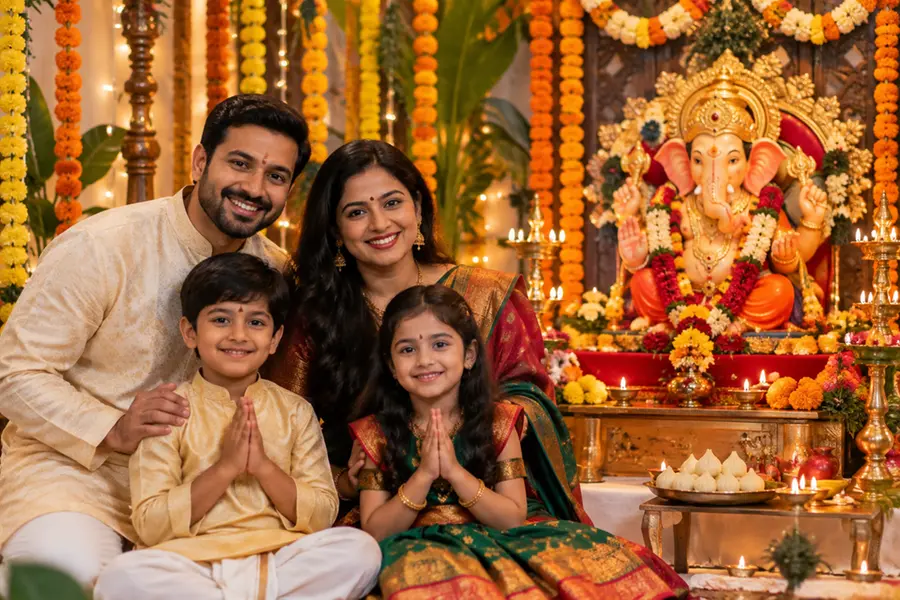
Ganesh Chaturthi is not only a time for prayers, celebrations and family gatherings but also an occasion when people look for creative ways to capture and share their festive moments. This year, artificial intelligence tools such as ChatGPT can give ordinary family photographs a festive makeover with just a carefully written prompt.
Instead of changing the people in the photograph completely, users can ask ChatGPT to place their existing family photo in a traditional Ganesh Chaturthi setting.
The background, lighting, decorations, clothing and overall festive atmosphere can be transformed while retaining the family's original appearance.
The process is relatively simple. Users can upload a suitable family photograph and describe the kind of Ganesh Chaturthi setting they want.
A detailed prompt generally produces better results because it tells the AI what should be changed and what should remain untouched.
How to transform your family photo using ChatGPT
Step 1: Choose your family photo
Select a clear, high-resolution family photograph.
A picture in which everyone's face is clearly visible generally works better.
Avoid heavily blurred or extremely dark photographs.
Step 2: Upload the photo to ChatGPT
Open ChatGPT and start a conversation.
Use the image upload option to add your family photograph.
Wait for the image to be processed before entering the transformation instructions.
Step 3: Copy and paste this prompt
'Transform this family photograph into a beautiful traditional Ganesh Chaturthi celebration. Keep every person's face, facial features, skin tone, identity, body proportions and expressions as close to the original photograph as possible. Dress the family in elegant traditional Indian festive clothing without changing their identities. Add a beautifully decorated Ganesh idol in the background, marigold flowers, torans, diyas, rangoli, traditional decorations and a warm festive home atmosphere. Use natural, realistic lighting and rich but authentic festive colours. Make the final image look like a high-quality professional family photograph taken during Ganesh Chaturthi. Do not add text, captions, watermarks or extra people. Preserve the original composition wherever possible.'
Step 4: Ask for specific changes
Want a more traditional appearance? Ask for sarees, kurtas, dhotis or other festive Indian attire.
Want a home celebration? Ask for a decorated puja area with flowers, diyas and rangoli.
Want a grander setting? Ask for a beautifully decorated Ganpati pandal.
Want a cinematic photograph? Ask for soft cinematic lighting and professional photography.
Step 5: Protect the original faces
If the AI changes someone's appearance, give a follow-up instruction such as:
'Keep the original faces and identities unchanged. Correct only the background, clothing and festive decorations.'
Step 6: Refine the image
If the first result is not exactly what you wanted, continue with specific instructions rather than rewriting the entire prompt. For example:
'Make the Ganesh Chaturthi decorations more traditional and realistic while keeping all family members unchanged.'
Another prompt for a traditional home celebration
'Use this exact family photograph as the base. Transform the setting into an elegant traditional Ganesh Chaturthi celebration at home. Keep all family members recognisable and preserve their original faces, expressions and identities. Add a beautifully decorated Ganesh idol, marigold garlands, diyas, rangoli, flowers and traditional festive decorations. Give the family elegant Indian festive clothing while maintaining their natural appearance. Create realistic photography, warm lighting and an authentic celebratory atmosphere. Do not add text, captions, watermarks or additional people.'
The key to getting a convincing result is to be specific about what should change and what should stay untouched.
Users can also experiment with different settings, outfits and photographic styles to create personalised Ganesh Chaturthi memories from their existing family pictures.
Published: 10 Sept 2026, 07:37 pm IST
ABOUT THE AUTHOR

Related Topics
Disclaimer: Kindly avoid objectionable, derogatory, unlawful and lewd comments, while responding to reports. Such comments are punishable under cyber laws. Please keep away from personal attacks. The opinions expressed here are the personal opinions of readers and not that of Mathrubhumi.