
iPadOS 26 introduces advanced window controls, Preview app, and powerful multitasking tools
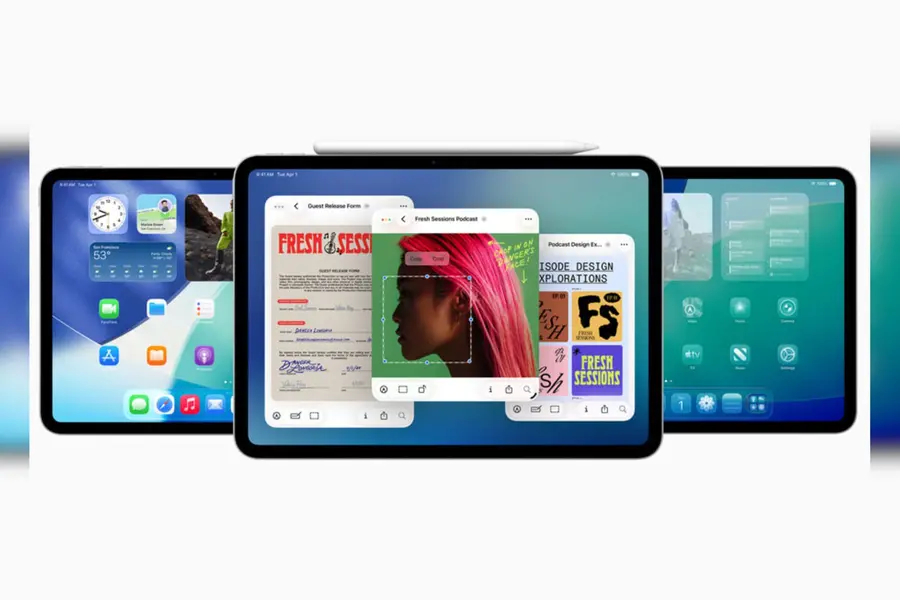
Cupertino (California): Apple unveiled iPadOS 26 on Monday as part of its suite of announcements at its Worldwide Developers Conference (WWDC) 2025, marking the most ambitious refresh of the platform to date.
The update debuts a refreshed visual style alongside an intuitive windowing system with new features that help users control, organise, and switch between apps; deeper Apple Intelligence tools, significant upgrades for file, audio, and video handling; and a suite of brand-new apps and enhancements.
A beautiful new design
The interface adopts a “Liquid Glass” aesthetic—translucent panels that dynamically reflect surroundings and subtly shift with user input. It brings a fresh sense of vibrancy to key areas like the Lock Screen and Control Centre, while offering users more ways to customise their Home Screen. App icons now feature dynamic light and dark versions, along with vivid new tints and a refined, clear look. These visual enhancements and updated navigation elements also appear in apps such as Mail, Safari, Apple TV, Apple Music, and others.
An entirely new, powerful and intuitive windowing system
iPadOS 26 lets users interact with app windows using familiar controls—closing, minimising, resizing, or tiling them with ease. Designed specifically for iPad’s capabilities, the window tiling feature lets users organise windows effortlessly using simple flick gestures. If an app was previously resized, it reopens in exactly the same dimensions and spot, preserving the user’s preferred layout. With the Exposé feature, all open windows are displayed at once, making it easy to switch between tasks. This enhanced windowing experience integrates smoothly with Stage Manager for users who prefer working in structured groups of apps, and it functions seamlessly with external displays to extend workspace flexibility even further.
Preview App comes to iPad
For the first time, iPad features a dedicated Preview app—ideal for sketching with Apple Pencil, editing PDFs, and marking up images. It supports blank canvases, pencil and touch input, and AutoFill features for filling forms.
Additional iPadOS 26 updates
Available in the tool palette, the new reed pen stylus option simulates traditional calligraphy across multiple Apple apps and third-party tools using the PencilKit API.
Calculator adds 3D graphing in Math Notes for plotting equations with three variables and creating a graph in three dimensions.
Notes can export/import Markdown files and record phone-app conversations with transcripts.
Accessibility enhancements include system-wide Accessibility Reader, a smoother Braille Access interface, and Share Accessibility Settings to temporarily transfer accessibility configurations to another person’s device, and more.
Published: 10 Jun 2025, 11:16 am IST
Disclaimer: Kindly avoid objectionable, derogatory, unlawful and lewd comments, while responding to reports. Such comments are punishable under cyber laws. Please keep away from personal attacks. The opinions expressed here are the personal opinions of readers and not that of Mathrubhumi.
