
Want more control over AI images? ChatGPT Images 2.5 lets users sketch an idea, point to parts of an image, edit photographs, use templates and share prompts. Here is how the new tools work, along with ready-to-use prompts for popular AI image styles.
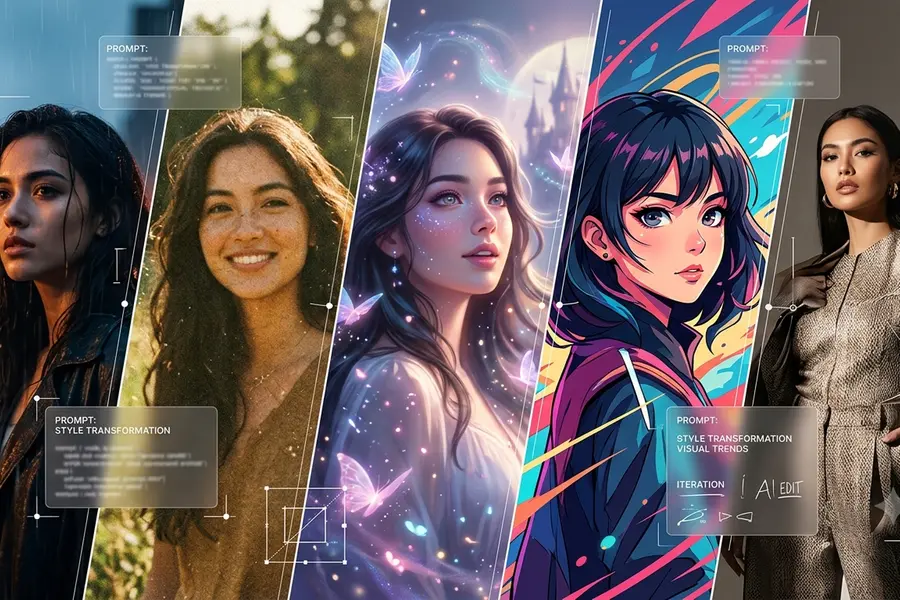
AI image creation is moving beyond simply typing a prompt and waiting for a picture. With ChatGPT Images 2.5, OpenAI is adding tools that let users draw an idea, point to an object, edit specific details, use templates and share prompts.
The result is a more interactive way to create images. Instead of trying to describe every visual detail in words, users can now combine prompts with sketches, comments and reference photos to guide the result.
What is ChatGPT Images 2.5?
OpenAI’s latest image-generation update focuses on three things: better image quality, more precise editing and faster generation.
The model is designed to preserve important details from reference images, follow more specific editing instructions and maintain consistency when an image is edited repeatedly.
OpenAI also says image-generation latency can be reduced by up to 50% compared with Images 2.0, making it quicker to generate an image, make a change and try again.
But some of the most interesting changes are not about speed. They are about how users interact with the image.
1. Sketch it: Turn a rough doodle into an image
One of the most playful additions is Sketch.
You do not need to be an artist. You can draw a rough layout directly in ChatGPT and use it as a visual guide for the image you want to create.
Think of the sketch as the map and the written prompt as the instructions.
For example, a quick drawing of a box, a triangle and a few wavy lines could represent a cabin, a mountain and trees. The sketch establishes where the elements should appear, while the prompt explains what they should become.
This can be useful when an idea is difficult to explain in words but easy to draw.
Try this Sketch prompt
Prompt:
“Use my sketch as the basic layout. Turn the main structure into a cosy wooden cabin surrounded by pine trees, with mountains in the background, warm evening light and a realistic cinematic look. Keep the approximate position of the elements from the sketch.”
2. Point at it: Change one detail without remaking everything
Ever asked an AI image generator to change one tiny detail and ended up with an entirely different picture?
ChatGPT Images 2.5 is designed to make these targeted edits more reliable.
Users can add comments directly to an image to identify the area they want changed. Instead of writing a long explanation about where an object is located, they can point to it and describe what should happen.
Want to change a mug from white to blue? Remove an object from the background? Alter one piece of clothing?
A focused comment can make the editing instruction much clearer.
Try this targeted-edit prompt
Prompt:
“Change the mug to a blue ceramic mug. Keep the person's face, pose, clothing, lighting, table and background unchanged.”
The basic idea is simple: tell AI what to change and what to leave alone.
3. Upload a photo and keep the important details
Images 2.5 also focuses on reference-image fidelity.
Users can upload an existing photograph and ask ChatGPT to transform it into a different setting or visual style while retaining important characteristics of the original.
OpenAI says the updated model is better at preserving subjects, lighting, textures and distinctive features from reference images.
That means you can use an existing photograph as the starting point rather than recreating the scene from scratch.
For example, a portrait could be transformed into a cinematic scene, a vintage photograph or an editorial-style image while asking the model to preserve the person's appearance.
The model is also designed to maintain greater consistency across multiple rounds of editing, allowing users to refine an image without every new instruction undoing previous changes.
Try this photo-editing prompt
Prompt:
“Transform this portrait into a cinematic editorial photograph set in a modern city at sunset. Keep the person's facial features, hairstyle, clothing, pose and overall appearance unchanged. Preserve realistic skin texture and natural lighting.”
4. It is faster too
OpenAI says Images 2.5 can reduce image-generation latency by up to 50% compared with Images 2.0.
That matters because creating an AI image is rarely a one-step process.
You generate an image, notice something you want to change, edit it, inspect the result and possibly repeat the process several times.
Faster generation means less waiting between those creative experiments.
5. Templates give you a starting point
Not sure what to write when you need a poster, product image or another visual?
Templates provide a starting structure instead of leaving users with a completely blank prompt.
You can choose a format and then customise its text, visual elements and overall style.
It can turn the process from “Where do I even start?” into “Here is the structure — now make it mine.”
6. Share the prompt, not just the picture
Another useful addition is prompt sharing.
When users share an image, they can also share the prompt used to create it. Someone else can then take that creative idea and adapt it using their own image, subject or details.
That means an interesting prompt can become something people experiment with and remix rather than simply something they look at.
How to use ChatGPT Images 2.5
Getting started is relatively simple.
Open ChatGPT and select Images, or ask ChatGPT to create an image directly.
For editing, upload an existing photograph and describe the changes you want.
On mobile, users can access Sketch by typing @ in the message box and selecting Sketch. They can then draw their idea and explain what they want the final image to look like.
For a specific correction, open the image, add a comment to the relevant area and describe the change.
The key is to be specific about both the change and the elements that should remain unchanged.
The simple AI image prompt formula
A useful formula for building image prompts is:
Subject + style + lighting + colours + setting + composition + texture + what should remain unchanged
For example:
Prompt:
“Transform this portrait into a cinematic editorial photograph with warm golden-hour lighting, muted earthy colours, a softly blurred city background, shallow depth of field and subtle film grain. Keep the person's facial features, hairstyle, clothing and pose unchanged.”
This structure works because it tells the image model both what you want to create and what you do not want it to alter.
10 AI image prompt styles to try
The same photograph can look completely different depending on the style, lighting, colours and atmosphere described in the prompt.
Here are 10 styles to experiment with.
1. Cinematic look
For a dramatic, movie-like image, focus on lighting, framing and atmosphere.
Prompt:
“Transform this image into a cinematic movie still, with dramatic lighting, rich shadows, realistic skin texture, shallow depth of field, subtle film grain, a detailed background and a wide-screen composition.”
2. Vintage film style
Want an old-camera feel? Mention film grain, muted colours and analogue imperfections.
Prompt:
“Give this image a vintage 1970s film photography look, with warm muted colours, natural grain, soft contrast, slightly faded tones and authentic analogue texture while keeping the subject's appearance unchanged.”
3. Anime-inspired style
For an illustrated transformation, describe the visual characteristics you want.
Prompt:
“Turn this image into a detailed Japanese animation-inspired illustration, with expressive eyes, clean linework, soft shading, vibrant colours and a beautifully detailed background while preserving the main subject's pose and composition.”
4. Watercolour painting
This style works well for a softer, hand-painted appearance.
Prompt:
“Reimagine this image as a delicate watercolour painting, with translucent brush strokes, soft edges, subtle paper texture, gentle colours and hand-painted details while keeping the original composition recognisable.”
5. Editorial fashion look
For a polished magazine-style image, focus on studio lighting and composition.
Prompt:
“Transform this photo into a high-end fashion editorial photograph, with studio lighting, sophisticated styling, clean composition, subtle shadows, realistic fabric textures and a premium magazine aesthetic.”
6. Cyberpunk aesthetic
Neon colours and futuristic surroundings can completely change the atmosphere.
Prompt:
“Transform this scene into a futuristic cyberpunk city at night, with neon signs, reflective streets, atmospheric haze, dramatic blue and pink lighting, futuristic architecture and cinematic depth while keeping the main subject clearly recognisable.”
7. Polaroid aesthetic
For a casual and nostalgic look, describe the characteristics of instant photography.
Prompt:
“Give this photo an authentic Polaroid instant-camera aesthetic, with soft flash lighting, subtle film grain, slightly faded colours, natural imperfections, a white instant-photo border and a candid nostalgic mood.”
8. Luxury campaign style
This can give a portrait or product image a polished advertising appearance.
Prompt:
“Turn this image into a luxury brand campaign photograph, with elegant studio lighting, refined composition, premium textures, subtle highlights, a minimalist background and a sophisticated high-fashion advertising aesthetic.”
9. Dreamy fantasy look
For a more imaginative result, focus on atmosphere and environment.
Prompt:
“Transform this image into a dreamy fantasy scene with glowing light, soft mist, floating particles, magical surroundings, ethereal colours and intricate details while preserving the subject's identity and overall pose.”
10. Retro magazine cover
Combine a specific era with editorial photography for a bold graphic look.
Prompt:
“Transform this image into a stylish 1990s magazine cover photograph, with bold studio lighting, slightly grainy film texture, retro colour tones, confident composition and authentic editorial styling.”
What makes ChatGPT Images 2.5 different?
The bigger change is not simply that AI can generate prettier images. It is the increased emphasis on creative control and editing.
A sketch can establish the layout. A written prompt can explain the concept. A comment can identify exactly what needs to change. A reference photo can provide the starting point. A template can provide the structure.
Users can then keep refining the result instead of starting over every time.
OpenAI says ChatGPT Images and its GPT-Image models together generate more than 3 billion images each week, highlighting the scale of AI image creation.
Who can use ChatGPT Images 2.5?
OpenAI says ChatGPT Images 2.5 is rolling out across ChatGPT, ChatGPT Work and Codex on desktop, mobile and web.
OpenAI's Images help documentation also says ChatGPT Images is available across ChatGPT tiers.
For developers, OpenAI has introduced two API models — GPT-Image-2.5 Flare and GPT-Image-2.5 Sunburst — aimed at different image-generation workflows.
The bigger picture: AI images are becoming more interactive
The interesting shift with ChatGPT Images 2.5 is from simply asking AI to make a picture to actively directing the creative process.
You can draw the rough idea, explain the concept, point to the part that needs fixing, preserve the details you care about and continue editing until the result gets closer to what you imagined.
For users experimenting with AI image trends, that means the prompt is no longer the only tool. Your sketch, reference photo, comments and editing instructions can all become part of the creative process.
(Disclaimer: AI-generated images and outputs may contain inaccuracies, inconsistencies or unexpected changes. Results can vary depending on the prompt, reference image and editing instructions. Users should review AI-generated content before using or sharing it.)
Published: 24 Sept 2026, 01:10 pm IST


ABOUT THE AUTHOR

Related Topics
Disclaimer: Kindly avoid objectionable, derogatory, unlawful and lewd comments, while responding to reports. Such comments are punishable under cyber laws. Please keep away from personal attacks. The opinions expressed here are the personal opinions of readers and not that of Mathrubhumi.