
The issue, which causes a vertical or sometimes horizontal green line to appear on the screen, has been widely reported across social media platforms...
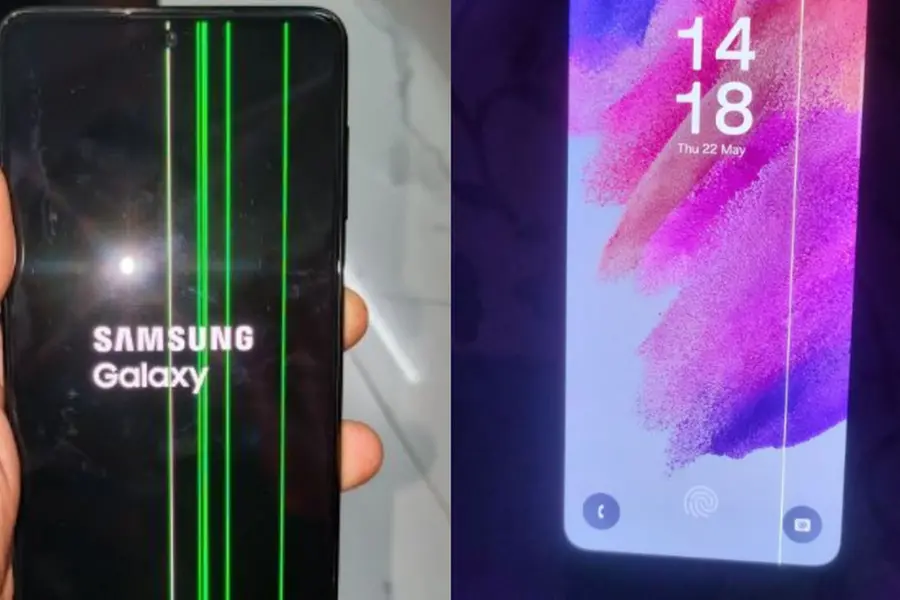
Samsung devices are once again under scrutiny as multiple users report the reappearance of the persistent "green line" display issue.
The issue, which causes a vertical or sometimes horizontal green line to appear on the screen, has been widely reported across social media platforms. Although not affecting every unit, it has raised concerns among consumers due to its recurrence across different Samsung models over the years.
One user posted on X (formerly Twitter), “After updating my Galaxy S21 FE to One UI 7, a green line appeared on the display. The phone was perfectly fine before the update. This seems to be a known issue. Please provide support or guidance.”
Another affected user, Husain Chauhan, wrote, “Samsung S21 FE (Snapdragon 888 variant), purchased on 8th October 2023. After a recent software update, a green line appeared on the screen. There is no physical damage to the device.”
The green line typically appears as a bright vertical stripe disrupting on-screen content, although some users have also reported pink or white lines. While the root cause remains unclear, it is often linked to AMOLED panel vulnerabilities, particularly following software updates or overheating.
In response, Samsung has reportedly extended its free one-time screen replacement policy for select models, including the Galaxy S22 Ultra and Galaxy S21 series, at authorised service centres across India. According to recent reports, this extended support will be available until September 2025. However, eligibility will depend on various factors, such as purchase date, warranty status, and physical condition of the device.
Resolve the issue own your own
If a green line appears on your Samsung Galaxy smartphone after a software or security update, start by restarting the phone. Power it off completely, wait a few minutes, then restart. This can often clear temporary software glitches. If that doesn’t work, uninstall any recently used or suspicious apps and revert any new settings.
Next, reboot your device in Safe Mode by holding the volume down button when the Samsung logo appears during startup. This disables third-party apps and helps identify if one of them is causing the issue. Also, check for any new system updates, as Samsung may release a fix in a later patch.
If the issue persists, consider a factory reset as a last resort—just be sure to back up all your data first. Still not resolved? Visit an authorised Samsung service centre, as the problem may require screen replacement or hardware-level repair.
Published: 01 Jun 2025, 09:53 am IST
Related Topics
Disclaimer: Kindly avoid objectionable, derogatory, unlawful and lewd comments, while responding to reports. Such comments are punishable under cyber laws. Please keep away from personal attacks. The opinions expressed here are the personal opinions of readers and not that of Mathrubhumi.
