
The Lofi Dusk trend is everywhere! Here’s how to recreate the cinematic glow using ChatGPT, Google Gemini and other AI tools with simple prompts.
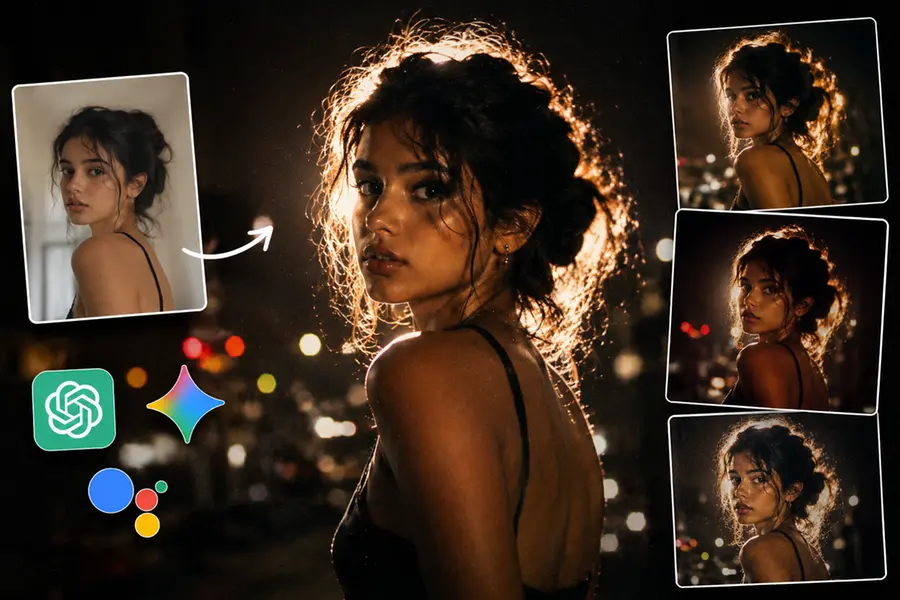
The Lofi Dusk aesthetic has quickly taken over Instagram, with feeds now filled with moody, retro-style portraits drenched in soft glow, grainy textures and dramatic backlighting. While the platform recently rolled out its own AI-powered Lofi Dusk filter for Stories, creators are increasingly turning to external AI tools, including ChatGPT, Google Gemini and Google Assistant, to recreate and customise the look in greater detail.
The effect mimics low-light analogue photography, blending warm skin tones, rim lighting, bloom, and Y2K-style digital grain. Sunset and night-time shots tend to work best, as they already match the cinematic ambience that defines the trend.
Below is a guide to understanding the Lofi Dusk style and how to use AI tools to generate the look yourself.
What is the ‘Lofi Dusk’ trend?
The Lofi Dusk aesthetic draws inspiration from flash-lit analogue photos, combining saturated highlights with deep shadows and soft, hazy glow. The look typically features:
- Rim lighting around the subject
- Bloom and halation around light sources
- Prominent film-style grain and CCD digital textures
- Muted dusk tones and shallow depth of field
- Warm, realistic skin tones
The style has gained traction among creators posting selfies, travel portraits and nighttime street scenes, largely because it gives ordinary smartphone images a cinematic, professionally lit feel without complex editing.
Why creators are turning to AI tools
Although Instagram's built-in Lofi Dusk effect provides a quick option, the platform’s generative AI occasionally alters facial details and background elements in unintended ways. As a result, many users are opting for external AI tools that offer more control over lighting, contrast and overall mood.
AI generators allow users to upload a portrait and describe the desired look in detailed text prompts. The tool then produces a stylised version of the original image based on the instructions.
How to create the ‘Lofi Dusk’ look with ChatGPT, Gemini and other AI platforms
Most creators start with a simple portrait and use AI to replicate cinematic low-light effects. The final images generally include glowing backlight, film grain, blurred backgrounds and soft flash-style illumination.
Here are sample prompts users employ across different AI tools:
- Prompt 1: “Produce a dark, atmospheric night portrait with a bright backlight that forms a rim glow around the subject. Add soft bloom, halation, DSLR-style flash, Y2K-era grain, shallow focus, blurred city lights, realistic skin tones and subdued dusk colours. Make it resemble a disposable-camera flash photo with soft glow diffusion.”
- Prompt 2: “Convert this photo into a Lofi Dusk-style portrait with deep shadows, dreamy glow around highlights, soft flash lighting, subtle mist effects, vintage CCD grain, blurred night-time background, warm skin tones and reflective lighting. Use an 85mm DSLR look with photorealistic detail.”
- Prompt 3: “Edit this image into a cinematic Lofi Dusk portrait with strong backlight, soft bloom, natural skin texture, blurred urban lights, warm dusk tones and grainy retro digital textures.”
- Prompt 4: “Create a night portrait in Lofi Dusk style with vintage CCD grain, neon glow, overexposed highlights, shallow depth of field and a blurred city backdrop.”
- Prompt 5: “Generate a retro disposable-camera effect with dusk ambience, flash-lit subject, muted colours, glow around the edges, lens blur and film grain.”
- Prompt 6: “Produce a warm-toned Lofi Dusk portrait with cinematic bloom, DSLR flash lighting, soft shadows, blurred traffic lights and nostalgic early-2000s digital grain.”
- Prompt 7: “Transform this selfie into an Instagram-style Lofi Dusk edit with dramatic evening light, silhouette glow, grainy texture, soft flash and a blurred night background.”
How to use Instagram’s built-In ‘Lofi Dusk’ filter
Instagram offers the Lofi Dusk look through its AI-driven Restyle tool and effect browser.
Using Restyle
- Open the app and swipe right to enter Stories.
- Select a photo from your gallery.
- Tap the Restyle icon at the top.
- Choose “Lofi Dusk” from the list of styles.
- Allow time for AI processing before saving or sharing.
Using the effect browser
- Open the Story camera.
- Swipe through the effects until you find “Browse effects.”
- Search for “Lofi Dusk.”
- Apply the effect to a new or existing photo.
Things to keep in mind
Because Lofi Dusk relies on cloud-based AI processing, an active internet connection is required. The filter can modify shadows, lighting depth and background elements, and in some cases may subtly change facial features, one reason many users prefer external AI tools for greater precision.
Published: 20 May 2026, 05:48 pm IST


Related Topics
Disclaimer: Kindly avoid objectionable, derogatory, unlawful and lewd comments, while responding to reports. Such comments are punishable under cyber laws. Please keep away from personal attacks. The opinions expressed here are the personal opinions of readers and not that of Mathrubhumi.
