THIS new Gemini AI prompt turns your photos into adorable crayon drawings; here's how
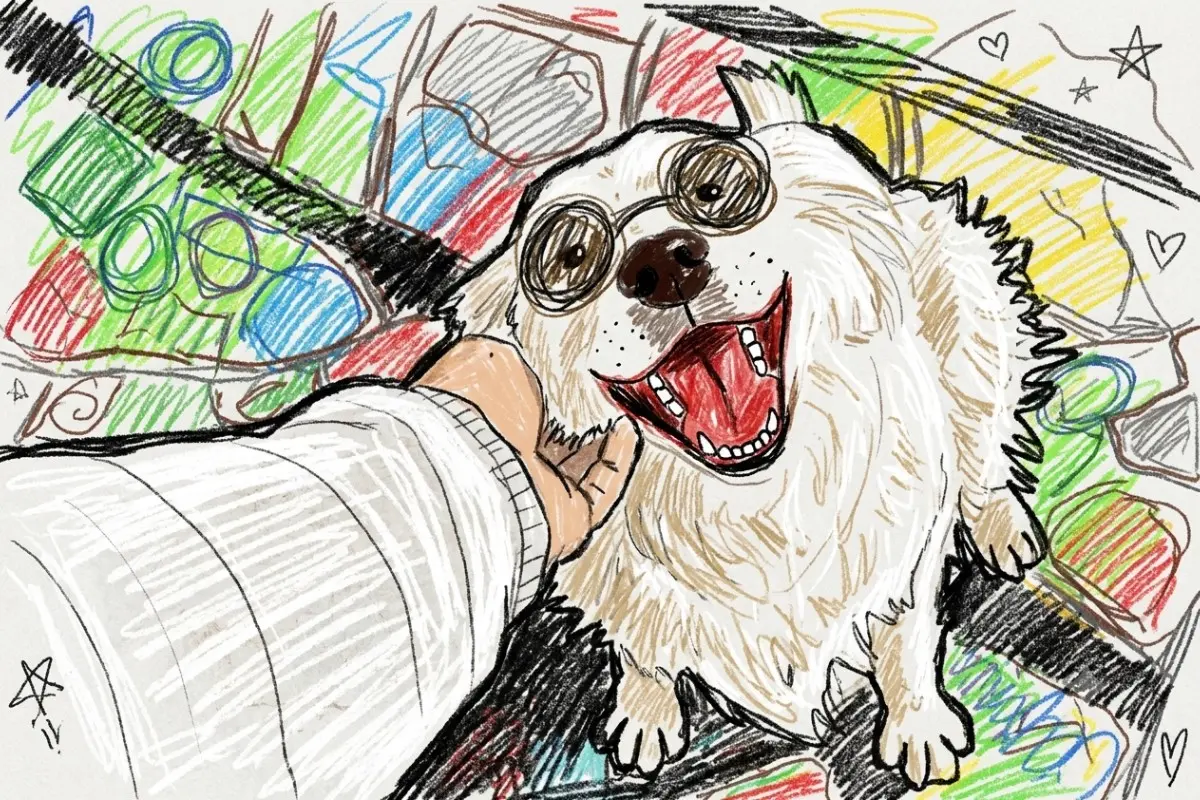
From anime transformations to action-figure portraits, AI image trends have been dominating social media. But one of the most wholesome trends yet involves turning photographs into colourful crayon drawings that look as though they were created during a kindergarten art class
This AI trend lets users transform ordinary pictures into crayon drawings that look like they were made by a young child, complete with colourful scribbles, wobbly outlines and charming mistakes. The result is equal parts nostalgic, funny and surprisingly emotional, which may explain why so many people are trying it on Gemini.
If you want to try the effect yourself, here's how to create the look using Gemini.
What is the crayon drawing AI trend?
The trend involves uploading a photograph and asking Gemini to recreate it as a childlike crayon drawing.
Unlike traditional photo filters, the AI does not simply add a texture over the image. Instead, it reimagines the entire photograph using the visual language of a young child's artwork, including wobbly outlines, bright colours, imperfect proportions and visible crayon strokes.
Also Read: How to create cinematic AI photos using viral
The final image often looks as if it has been drawn by a toddler who was trying their best to capture a special memory.
What kind of photos work best?
The effect tends to work particularly well on:
- Family portraits
- Couple photographs
- Pet pictures
- Travel snapshots
- Childhood photos
- Group selfies
- Outdoor scenes with colourful backgrounds
How to create the effect in Gemini
First, open Gemini and upload the photo you would like to transform.
Once the image has been uploaded, paste the prompt below exactly as written and submit it.
Transform this photo into a whimsical toddler crayon drawing. Keep the original composition, poses, facial expressions, clothing, and scenery recognizable, but recreate everything as if drawn by a young child using wax crayons on textured paper. Use messy, uneven coloring, visible crayon strokes, imperfect proportions, scribbly outlines, and exaggerated childlike details. Faces should be simple and cute with minimal features, oversized sunglasses if present, and playful expressions. Background elements should look hand-drawn and slightly distorted, with bright vibrant colors and random sketch-like shading. Preserve the mood and main objects of the original image while making it feel authentic, naive, imperfect, and charmingly chaotic like real kindergarten artwork. Add rough coloring outside the lines, layered crayon textures, uneven pressure marks, and hand-drawn child art energy. The final image should feel nostalgic, playful. handmade, and intentionally imperfect, like a toddler proudly drew it for the fridge.
Why the results look so real
What makes this prompt stand out is its focus on imperfections.
Instead of aiming for polished digital artwork, it specifically asks the AI to create uneven colouring, scribbled outlines, rough textures and childlike proportions. These details help the image resemble genuine crayon artwork rather than a professionally illustrated cartoon.
The prompt also instructs the AI to keep the original composition and facial expressions recognisable, which helps preserve the emotional connection to the photograph.
Why people love the trend
Part of the appeal lies in nostalgia. The finished images often remind people of childhood art projects, school drawings and handmade gifts.
Also Read: Want that Lofi Dusk-style photo? These ChatGPT prompts will turn your portraits cinematic
Many users are creating crayon versions of family portraits, pet photos and special memories because the style feels warm, personal and less polished than typical AI-generated artwork.
The effect also transforms everyday pictures into something playful and unique, making them popular for social media posts, profile pictures and personalised gifts.
Tips for better results
To get the best outcome, use a clear photo where faces and important details are easy to see. Images with strong lighting and uncluttered backgrounds often work particularly well.
-Compiled by Salma