Viral 80s AI trend: How to turn your photo into a 1980s look with ChatGPT; step by step
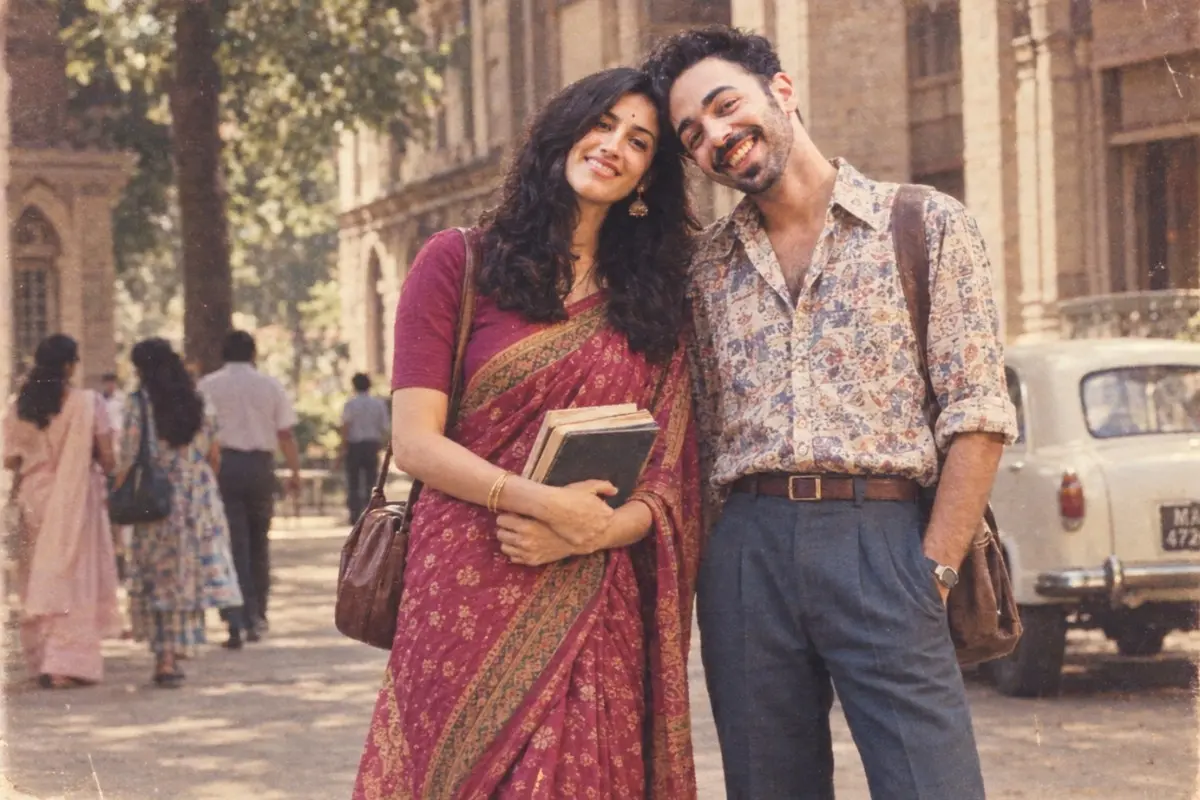
The ’80s are back! A new AI trend is letting people transform their current pictures into retro portraits that look like they belong to another decade.
If you want to see how you might have looked in 1980s, all you need is a photograph, ChatGPT and the right prompt.
Here’s how to do it.
Step 1: Pick the right photograph
Start by choosing a clear photograph of yourself. A front-facing or slightly angled portrait works best. Make sure your face is visible and not covered by sunglasses, heavy shadows or other people. You don't necessarily need a professional photograph. A simple selfie can work too.
Step 2: Upload the photograph to ChatGPT
Open ChatGPT and upload the photograph you want to transform.
Step 3: Copy and paste this prompt
Transform my uploaded photograph into a realistic photograph of me as I might have looked in India during the 1980s.
Keep my face, facial features, skin tone, face shape and overall identity recognisable. Do not unnecessarily alter my facial structure or make me look like a different person.
Give the image an authentic Indian 1980s appearance. Style me in clothing that would have been fashionable in India during the decade, such as a colourful saree with a period-appropriate blouse, salwar kameez, high-waisted trousers, a printed shirt, denim or a structured blazer. Choose an outfit that looks natural for the person in the original photograph.
Give me an authentic 1980s hairstyle with natural volume and period-appropriate makeup and accessories. Avoid modern beauty trends.
Set the photograph in a believable 1980s Indian environment, such as an old photo studio, Indian home, college campus, street or family gathering. Include subtle period details without making the setting look exaggerated or stereotypical.
Make the image look as though it was genuinely photographed in India during the 1980s on an analogue camera. Use realistic film grain, slightly faded colours, soft focus, natural skin texture and authentic period photography.
Do not add smartphones, modern buildings, contemporary clothing, modern cars or other present-day objects.
Most importantly, do not make this look like a modern photograph with an Instagram-style vintage filter. It should look like a genuine 1980s Indian photograph taken several decades ago.
For bollywood look just tweak the prompt with:“Give this a 1980s Bollywood-inspired fashion look, with dramatic hair, bold makeup and glamorous styling while keeping my face recognisable”
Also Read: Viral AI photo trend lets you create emotional ‘childhood self’ portraits; Here’s how
For western aesthetics, use this prompt:
Using the uploaded photo as the reference, create a realistic portrait of me as I would have looked in the 1980s. Keep my facial features, face shape, skin tone and overall identity recognisable.
Give the image an authentic 1980s fashion and beauty aesthetic: voluminous 1980s hair, era-appropriate makeup, bold but tasteful clothing, statement earrings and accessories. Dress me in a stylish outfit inspired by 1980s fashion, with details such as high-waisted trousers, a structured blazer, denim, bold prints or a leather jacket.
Make the photograph look like it was genuinely taken in the 1980s rather than like a modern image with an ’80s filter. Use realistic vintage film grain, slightly soft focus, natural skin texture, period-appropriate colours, subtle flash photography and an authentic 1980s studio or home-photo setting.
Avoid modern clothing, contemporary hairstyles, modern accessories, smartphones or anything that would make the image look like it was taken today. The final result should feel like a real photograph from an old family album or an authentic 1980s fashion portrait.
Step 4: Ask ChatGPT to fix anything that looks wrong
If the first result is not perfect, You don't have to start again. Once the AI generates the image, take a closer look at the details you love and anything you’d like to tweak. You can then ask for small adjustments until the final photograph captures the perfect 80s-inspired look. You can also ask it to make the photograph less polished if it looks too much like a modern AI-generated image.
Also Read: Clothes that fool AI? The strange new fashion trend with a twist
Step 5: Download and share the generated image
Save the AI-generated photograph to your device. Open the generated image in ChatGPT and look for the download option.
Click or tap it to save the picture to your phone or computer.
(Disclaimer: AI-generated images are creative interpretations and may not accurately represent the fashion, hairstyles, settings or photography styles of 1980s India. The results can also contain visual inaccuracies or altered facial details. Use AI-generated images for entertainment and creative purposes, and avoid presenting them as authentic historical photographs.)