Nano Banana AI trend: Best prompts to turn yourself into anime, movie, superhero characters
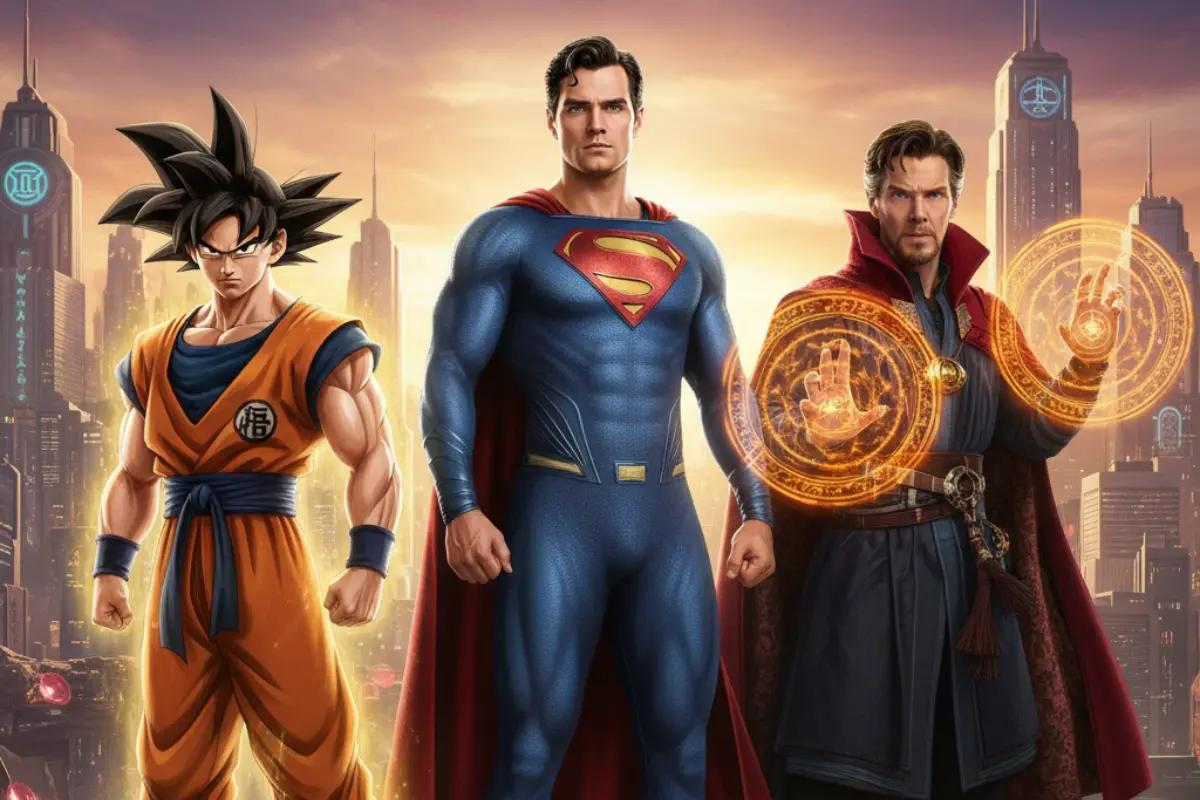
A fresh AI trend is captivating creators: Google’s Nano Banana AI trend, which is enabling people to reimagine themselves as figurines or retro or comic book characters. Whether it’s transforming a selfie into a Goku-style anime hero, recreating oneself in a cinematic scene, or stepping into a retro Bollywood-style hero look, Nano Banana lets anyone wield the magic of powerful text prompts and photo uploads to produce highly detailed, hyper-realistic 3D figurines.
Tech fans and pop culture lovers are embracing its ability to deliver dramatic, nostalgic, and visually striking transformations.
Here are some of the best prompts that will help you create eye‑catching and realistic images. Use them to bring your imagination to life and explore a whole new world of creative possibilities.
1. Goku from Dragon Ball
Transform this image into a high-quality, full-body portrait of this person transformed into Goku from Dragon Ball Z. The subject should have Goku's iconic spiky black hair, with a subtle golden aura emanating from it. They should be wearing a highly-detailed, slightly tattered orange gi with a dark blue undershirt and a blue belt tied around the waist. The pose should be dynamic and powerful, suggesting a moment of intense concentration or readiness for a fight. The background should be a dramatic, stylized landscape, such as a rocky, desolate field with storm clouds brewing or a vibrant, otherworldly environment. The image should be rendered in a highly realistic, cinematic style with sharp focus, vibrant colors, and dramatic lighting to emphasize muscle definition and the texture of the clothing.
2. Vegeta from Dragon Ball
Transform this image into a high-quality, full-body portrait of a person as Vegeta. The subject should have a sharp, intense gaze and a confident, arrogant smirk. They should have Vegeta's iconic spiky black hair with the widow's peak and a slightly shorter, more muscular build. They should be wearing the classic Saiyan battle armor with a white torso piece, yellow shoulder pads, and a blue jumpsuit underneath. The pose should be a classic Vegeta stance, with a proud and ready-for-combat posture. The background should be a dramatic, desolate, and rocky landscape with a stormy sky or a battlefield setting with energy blasts in the distance. The image should be rendered in a highly realistic, cinematic style with sharp focus, dramatic lighting, and vibrant colors to emphasize the character's power and intensity.
3. Classic Bollywood stars in retro posters
Transform this image into a high-quality, full-body portrait of a person as an 80s style Bollywood hero. The subject should have a youthful, slightly rugged appearance with a confident and charismatic expression. They should have a classic 80s Bollywood hairstyle, which could be anything from a shaggy mop-top to a perfectly coiffed look, and a distinct mustache or sideburns. The outfit should be a colorful, often flashy, 80s-era ensemble, such as a denim jacket over a vibrant shirt, bell-bottom pants, or a tight-fitting t-shirt. The pose should be dramatic and action-oriented, reflecting a common fight sequence of that era. The background should be a retro-looking set, such as a crowded city street, a lush green garden, or a colorful disco club, with a slight cinematic grain and lens flare to capture the nostalgic feel. The image should be rendered in a highly realistic, stylized cinematic aesthetic with vibrant, saturated colors and dramatic lighting.
4. Woody from Toy Story
Transform this image into a high-quality, full-body portrait of a person as Woody from Toy Story. The subject should have a friendly, determined expression and a slightly stylized, toy-like appearance. They should be wearing Woody's classic outfit: a yellow and red plaid shirt, a cow-print vest, a red neckerchief, blue jeans with a belt and buckle, and brown cowboy boots. The iconic brown cowboy hat should be on their head. The pose should be energetic and heroic, capturing Woody's confident and loyal personality. The background should be a whimsical, clean setting, such as a child's bedroom with colorful toys scattered around, a bright blue sky with wispy clouds, or a sun-drenched, playful environment. The image should be rendered in a highly realistic, stylized aesthetic with sharp details, vibrant colors, and cinematic lighting to capture the texture of the fabric and the plastic-like sheen of the toy.
5. Rapunzel from Tangled
Transform this image into a high-quality, full-body portrait of a person as Rapunzel from Tangled. The subject should have a gentle, kind expression with a curious and determined gaze. The most prominent feature should be the incredibly long, flowing blonde hair, which should be styled with a braid and adorned with intricate flowers. The outfit should be her iconic purple and pink dress, which should have delicate lace and floral patterns. The pose should be graceful and confident, perhaps holding a frying pan or a paintbrush. The background should be a magical, sun-drenched forest clearing or a vibrant scene from her tower room with a view of the outside world. The image should be rendered in a highly realistic, stylized aesthetic with soft, ethereal lighting and vibrant colors to capture the whimsical and enchanting feel of the character.
6. Flynn Rider from Tangled
Transform this image into a high-quality, full-body portrait of a person as Flynn Rider from Tangled. The subject should have a charming and roguish expression with a sly smirk. They should have Flynn's characteristic brown hair with a subtle wave and a confident gaze. The outfit should be his signature look: a dark blue or green tunic with a lighter brown vest over it, a white shirt underneath, and brown pants and boots. The pose should be charismatic and adventurous, perhaps with one hand on their hip or in a confident stride. The background should be a whimsical, fantastical setting from the movie, such as a sun-drenched forest path, a scene with lanterns floating in the sky, or a detailed shot of the kingdom's castle in the distance. The image should be rendered in a highly realistic, stylized aesthetic with vibrant colors and cinematic lighting to capture the adventurous and charming feel of the character.
7. Superman from DC
Transform this image into a high-quality, full-body portrait of a person as Superman. The subject should have a chiseled jawline, a determined expression, and classic comic book features. They should be wearing the iconic blue suit with the red and yellow "S" shield on the chest, a red cape flowing dynamically behind them, and red boots. The suit should have subtle texture and folds to give it a realistic feel. The pose should be powerful and heroic, suggesting flight or a heroic stance. The background should be a dramatic cityscape or a clear blue sky with fluffy clouds, emphasizing a sense of grandeur and heroism. The image should be rendered in a highly realistic, cinematic style with sharp focus, vibrant colors, and dramatic lighting.
8. Doctor Strange from Marvel
Transform this image into a high-quality, full-body portrait of a person as Doctor Strange. The subject should have a distinct goatee and a serious, focused expression. They should be wearing the iconic Eye of Agamotto amulet and the Cloak of Levitation, which should appear to be floating dramatically behind them. The outfit should be a deep blue tunic with an intricate pattern and a red sash. The pose should be powerful, as if casting a spell, with glowing orange magical runes and mandalas forming around their hands. The background should be a chaotic, visually stunning scene from the Multiverse or the Sanctum Sanctorum, with swirling colors and surreal architecture. The image should be rendered in a highly realistic, cinematic style with sharp focus, vibrant colors, and dynamic, mystical lighting.
How to make the photos with Google Gemini
Looking to jump on the trend and transform your photos into your desired character portraits? Follow these simple steps:
- Install the app: Download the Google Gemini app from the Play Store or App Store.
- Sign in: Log in with your Google account credentials.
- Upload your photo: Choose the image you want to convert into the desired style you want.